How to Get Good Leads from Digital Marketing on Facebook & Instagram
Last Updated: 12 Dec 2025

A Bit of Background About Me
My name is Varun, and I’m the Co-founder & CTO at GrowEasy. GrowEasy is a SaaS platform for SMBs to generate leads. We do this by running ads on Google, Facebook, Instagram, WhatsApp, and TikTok.
Our USP is a quick, self-serve platform where anyone can launch a lead generation campaign on Meta/Google/TikTok and start generating leads instantly. We handle everything needed — creatives, forms, copies, audiences, keywords — and provide detailed analytics so businesses can take action. Leads are delivered directly to WhatsApp and email (along with a downloadable CSV), and our AI + team continuously optimize campaigns for performance.
We’ve managed ad spends of over INR ~75 Lakhs on Meta and have been in this industry for 3+ years. But even with this experience, both Tej (my co-founder & CEO) and I sometimes face situations where campaign optimizations don’t yield results. We apply learnings, leverage AI, guide our customers — yet sometimes campaigns still underperform.
So no, I’m not an “expert” like the marketing gurus who claim they can solve all your problems in a 2-hour workshop. (I’ve even attended a couple of those myself — fell for the ads, but found no magic tricks.) What they share is pretty much what I’ll share with you here.
Key Highlights
- Lead generation performance depends on the balance between market demand and the competitiveness of your offering, making creative quality, audience targeting, and messaging essential for campaign success.
- Most lead generation failures on Meta stem from weak creatives, poor targeting, or lack of contextual relevance, which can be solved through strong visuals, regional language variations, optimized ad copies, and testing multiple creative formats.
- Lead quality improves significantly when using qualifying questions, Meta’s Conversion API, and structured feedback loops that train the algorithm to optimize for high-value leads instead of just volume.
- High CPL issues are typically resolved by diversifying placements, running multiple creative variations, using authentic UGC formats, studying ad insights, and maintaining consistent optimization cycles.
- Effective conversion and time savings require fast follow-ups, structured sales processes, and AI-driven lead filtering systems that automatically classify, prioritize, and nurture leads before they reach the sales team.
Challenges in Lead Generation
Before diving into solutions, let’s list out the common challenges in lead generation (specifically on Meta: Facebook, Instagram & WhatsApp):
- I don’t get leads.
- I do get leads, but they’re mostly junk/irrelevant.
- I get leads, but the cost per lead is too high.
- I get relevant leads at a good CPL, but I can’t convert them.
- I waste time on junk leads — I need an automated way to categorize/filter them.
If any of these sound familiar, you’re not alone. Every marketer has faced these at some point. Let’s talk about how to solve them.
Solving Lead Generation Challenges on Meta
Lead generation is largely a function of demand (target location) and supply (your business offering).
- If you’re targeting a location with little to no demand, your campaigns won’t work.
- If your offering isn’t competitive — or if pricing is too high — your acquisition cost will increase, and conversions will be harder.
- Your ticket size should also justify marketing expenses.
If those basics are sorted, here’s how to address the problems above.
Problem 1: I Don’t Get Leads
This is the most basic and most frustrating challenge. You’re spending money on ads, but no one is filling your forms or messaging you. In 90% of such cases, the problem lies in creatives and targeting.
How to fix it:
1. Focus on your creatives
Ads are visual-first. If your creative doesn’t capture attention in the first 2–3 seconds, people will scroll away. Videos usually work better than images because they hold attention longer and explain the product/service more effectively.
A good creative should:
— Be content-rich (tell people what’s in it for them).
— Build trust (logos, testimonials, social proof).
— Have a clear Call to Action (CTA) (e.g., “Book a free demo”, “Get your free quote”).
— Example: If you’re promoting a real estate project, show a quick video of an actual property walkthrough, highlighting the interiors, amenities, and neighborhood. This builds trust and feels real, unlike using a generic “luxury apartment” stock photo that looks the same everywhere.

2. Use regional languages where possible —
Ads in Hindi, Tamil, Bengali, or other regional languages (based on targeting location) often outperform English because they feel more relatable. I recommend including this variation of creative in your ad set and letting Meta automatically pick the best-performing one based on interactions.
3. Target the right audience
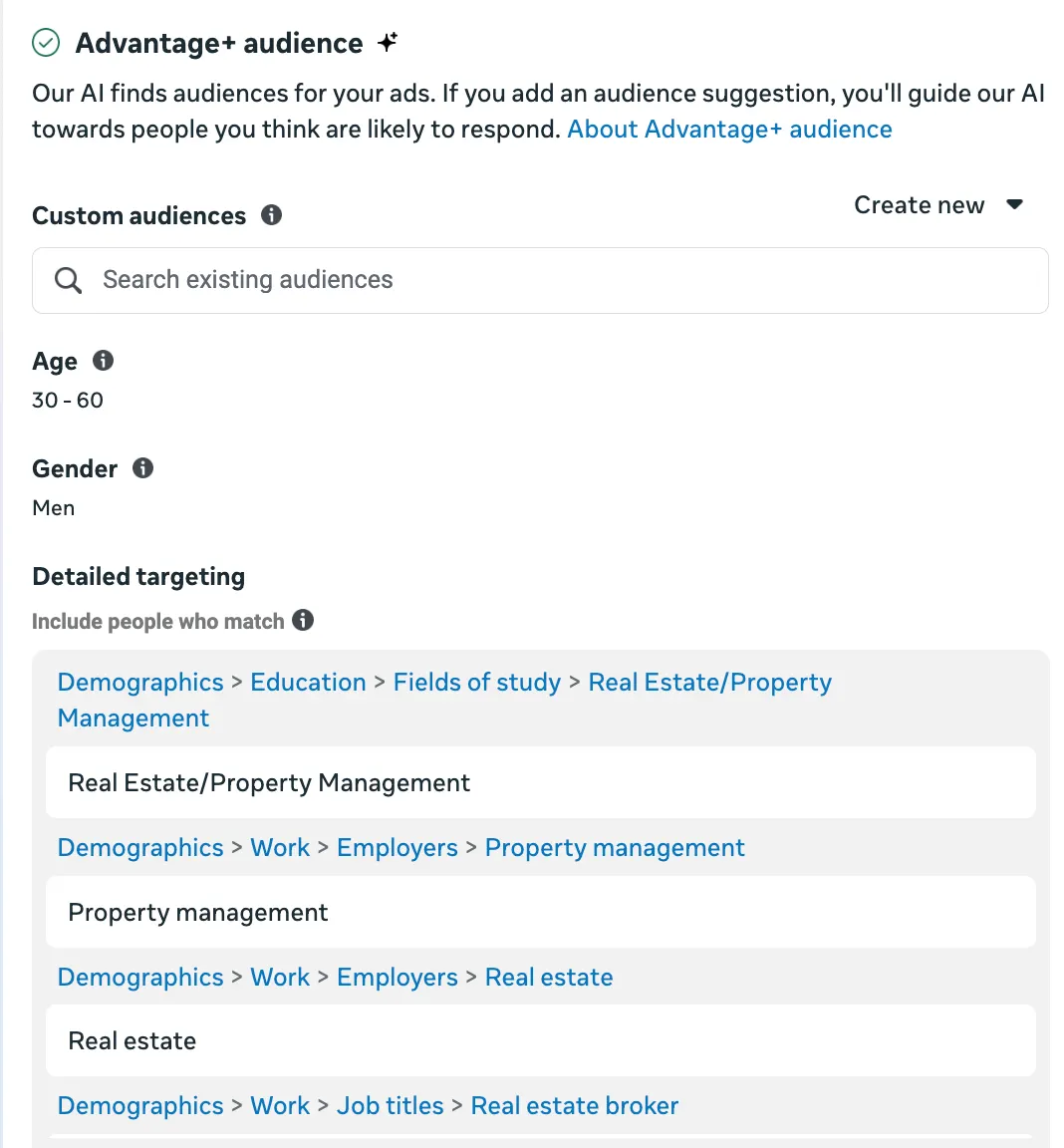
Targeting is the second most important factor in ads after creatives. We don’t fully know how Meta’s ad engine chooses audiences, but we should make the best use of the targeting tools available in Ads Manager.
Meta promotes Advantage+ Detailed Targeting. This means you can provide targeting suggestions, but the engine may deliver ads beyond your selected audience if it predicts better performance. If you’re new or unsure, sticking to Advantage+ is usually the safer bet.
Note: Campaigns under Special Ad Categories (Finance, Employment, Housing, and Politics) are not eligible for this feature.
To explore targeting options beyond the default Search & Find in Meta’s UI, you can leverage AI tools such as this one. There are also Custom Audiencesand Lookalike Audiences, but I’m skipping those here since they’re more advanced and not ideal for beginners.
4. Ad copies matters
The next thing to optimize is ad copy. There’s nothing new here that you don’t already know — copies should clearly communicate the value proposition, be simple and easy to grasp, and stay relevant to the creative.
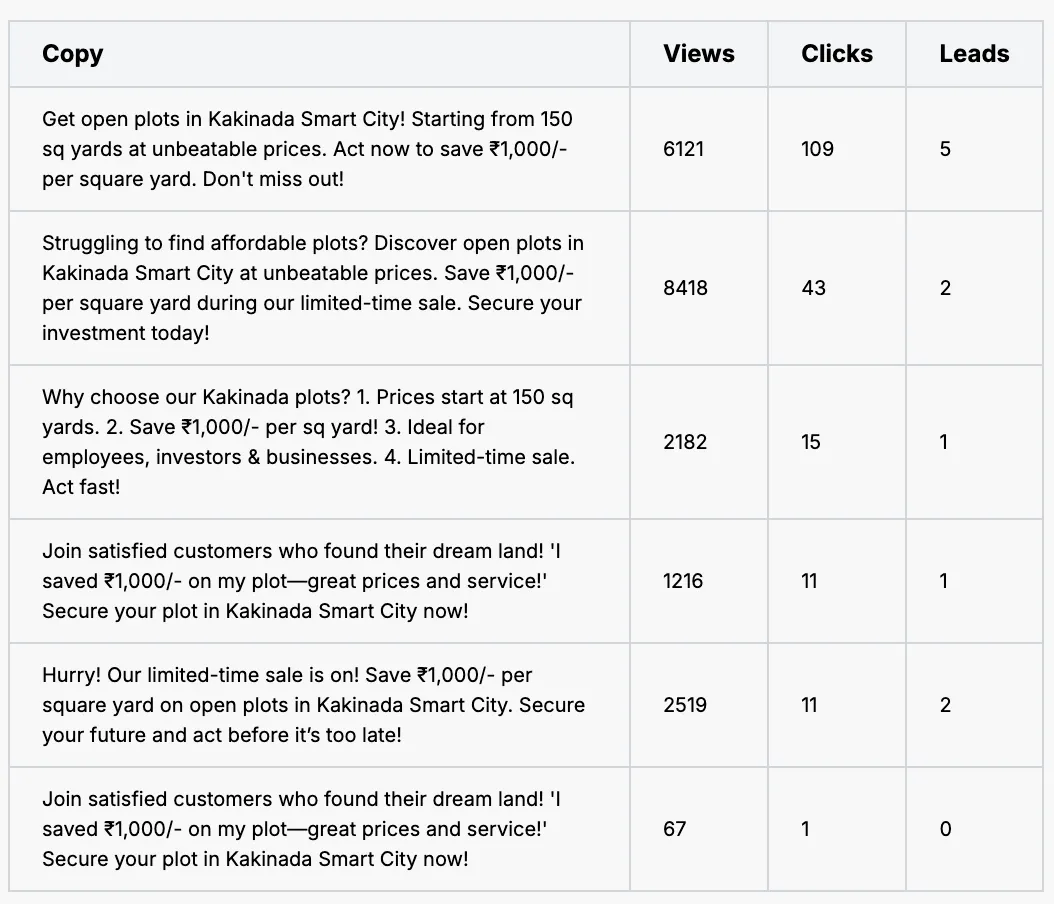
My suggestion is to test ad copies from different perspectives — for example:
- Direct, short-form copy
- Urgency + offer-driven copy
- Problem–solution format etc
Then, let Meta optimize and pick the best-performing one. You can also experiment with a few variations in regional languages.
Here’s how we do it at GrowEasy-
5. If using a landing page instead of instant forms:
One big advantage of using Meta’s native Lead Forms is that they’re built directly into the platform and often pre-filled with customer details. This makes it very convenient for users to submit their information.
However, if you choose to collect leads through a custom landing page, you need to ensure it is highly optimized:
- Content should align with the ad and preserve context.
- The page should load quickly.
- The design should guide users smoothly toward the form.
The benefit of a landing page is that you have more space to persuade and showcase value, but the trade-off is that it adds an extra step in the lead journey.
In my view, you should experiment with both native Lead Forms and optimized landing pages to see what works best for your audience.
Note: Don’t forget to set up proper tracking (Meta Pixel) on your landing pages. Without it, Meta won’t know which users actually submitted the form, and it won’t be able to learn or optimize your campaigns effectively. Lead Forms handle this tracking automatically.
6. Click to WhatsApp (CTWA) ads
This isn’t really an optimization step — it’s more of an alternative approach.
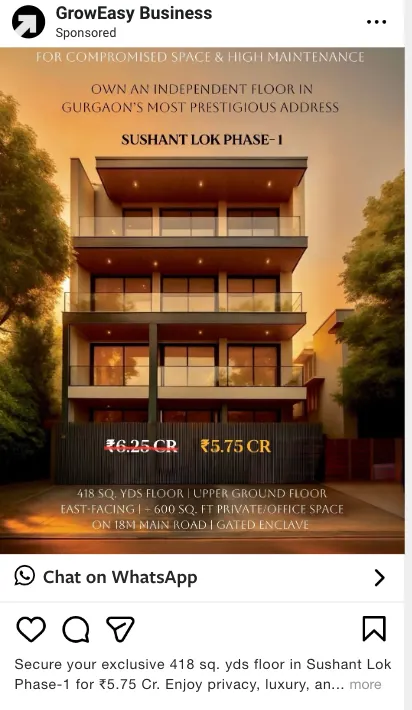
With Lead Forms or custom landing pages, users still have to go through a step in the lead journey. But what if the ad’s CTA directly opens WhatsApp with a pre-filled message? That’s exactly what Click-to-WhatsApp Ads (CTWA)do. With just one click, viewers can instantly start a conversation with your business on WhatsApp.
If you’re facing issues with lead quantity, CTWA is worth experimenting with. In my experience, it usually delivers higher lead volume but often at the cost of quality.
The challenge is that Meta doesn’t provide a direct way to evaluate lead quality from WhatsApp conversations, but you can signal it back using Conversion API or Offline Conversions. That said, this gap is likely to close soon, and CTWA will become easier to use and optimize.
Problem 2: I Do Get Leads, but They’re Junk/Irrelevant
This is probably the most common frustration — you’re getting leads, but they’re students, job-seekers, or people with no real intent.
How to fix it:
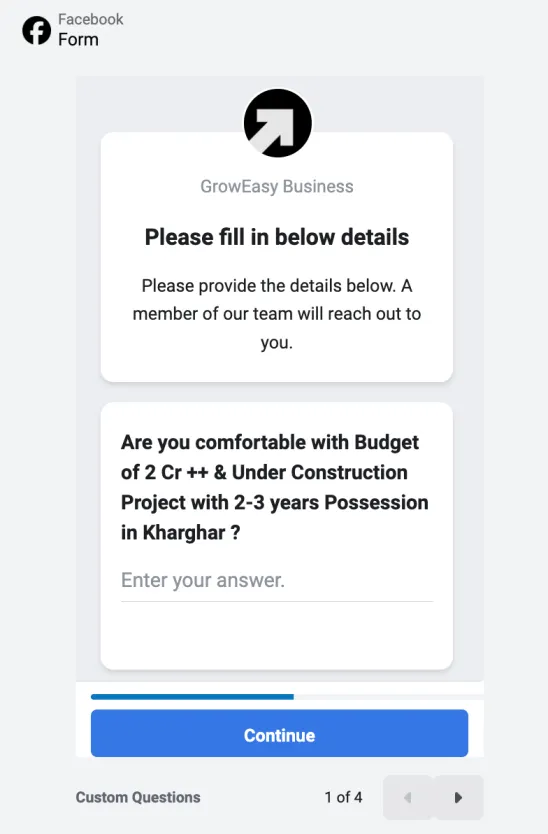
1. Use qualifying questions in your lead form.
Qualifying questions are custom fields you can add to Meta Instant Forms (in addition to the default name, mobile number, and email). While you can include multiple, usually 1–2 carefully chosen questions work best.
Example 1 (Software): If you sell software priced above ₹10,000/month, add a question like: “What is your monthly marketing budget?”
Example 2 (Real Estate): Be more explicit to filter only serious buyers, e.g.: “Are you comfortable with a budget of ₹2 Cr+ for an under-construction project with 2–3 years possession in Kharghar?”
These questions add healthy friction — they may reduce total lead volume, but they significantly increase the percentage of qualified leads while also giving you valuable context for follow-up.
2. Leverage Meta’s Conversion API (CAPI)
Whether you’re running Lead Ads or Engagement Ads (like CTWA), Meta gives you options to optimize for different conversion goals — broadly split into quantity vs. quality.
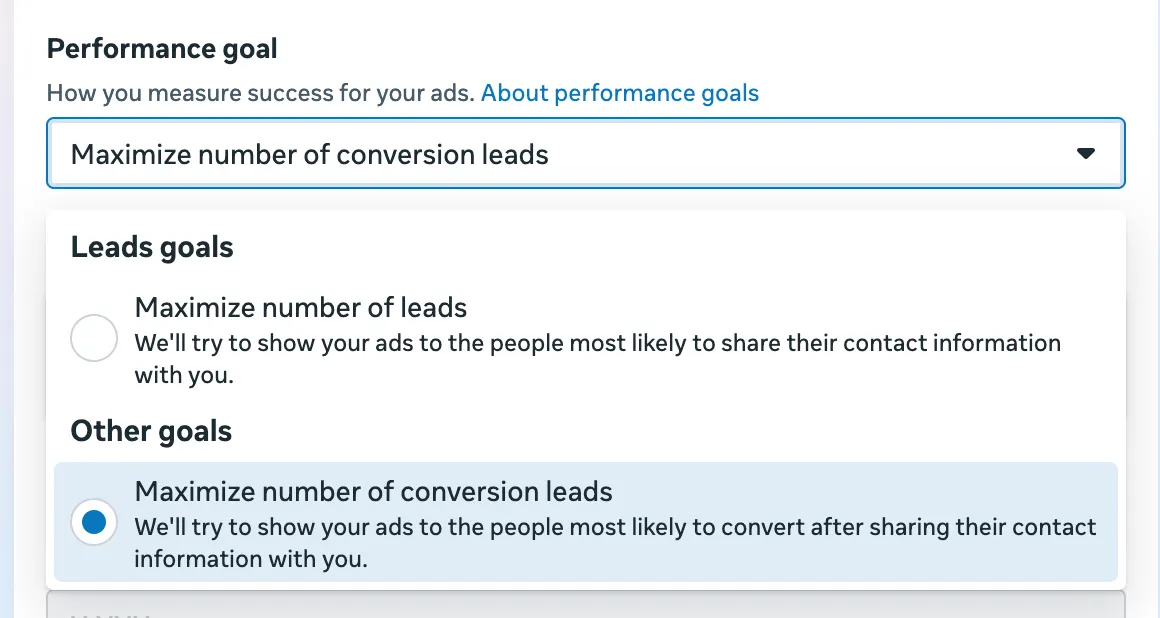
For Lead Ads, you can set the performance goal to “Maximize number of conversion leads.”
For Click-to-WhatsApp Ads (CTWA), you can choose “Maximize number of conversations.”
This helps Meta understand what outcome you care about most.
Important: Simply selecting these goals won’t guarantee better lead quality. For Meta’s optimization to actually work, you need to signal lead quality back to the ad engine. Otherwise, Meta will keep optimizing only for form submissions or chat initiations, not for truly valuable leads.
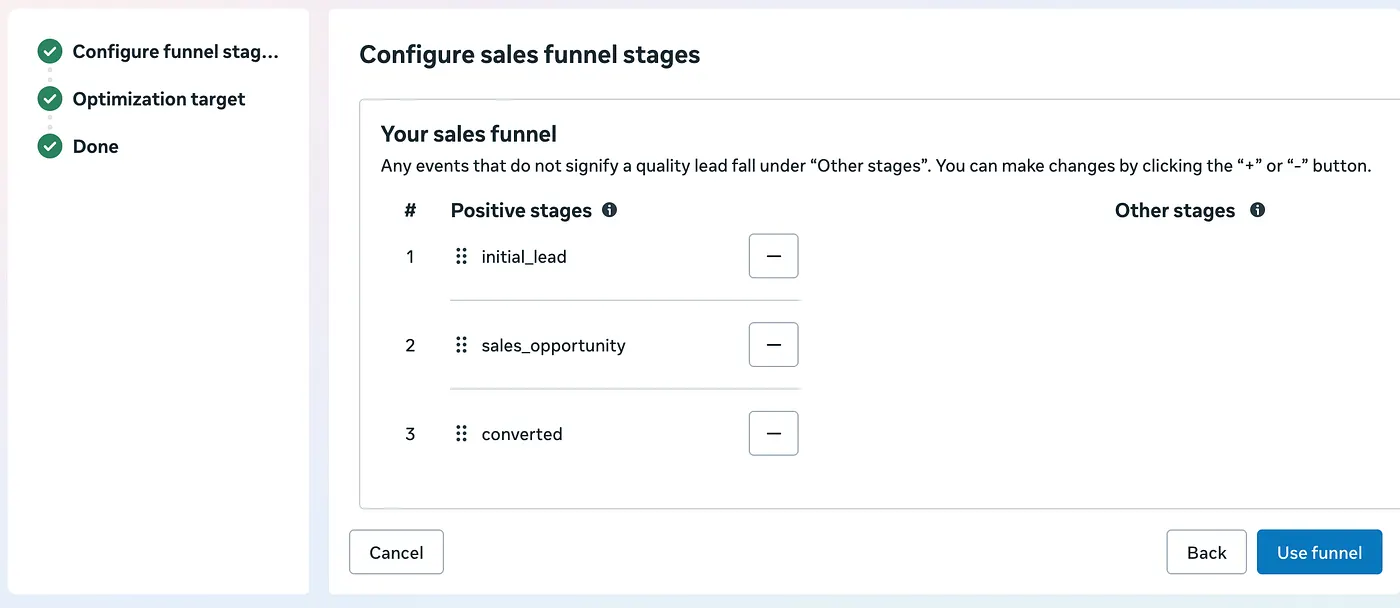
The way to achieve this is by integrating the Meta Conversion API (CAPI) directly into your CRM or backend system. Steps are-
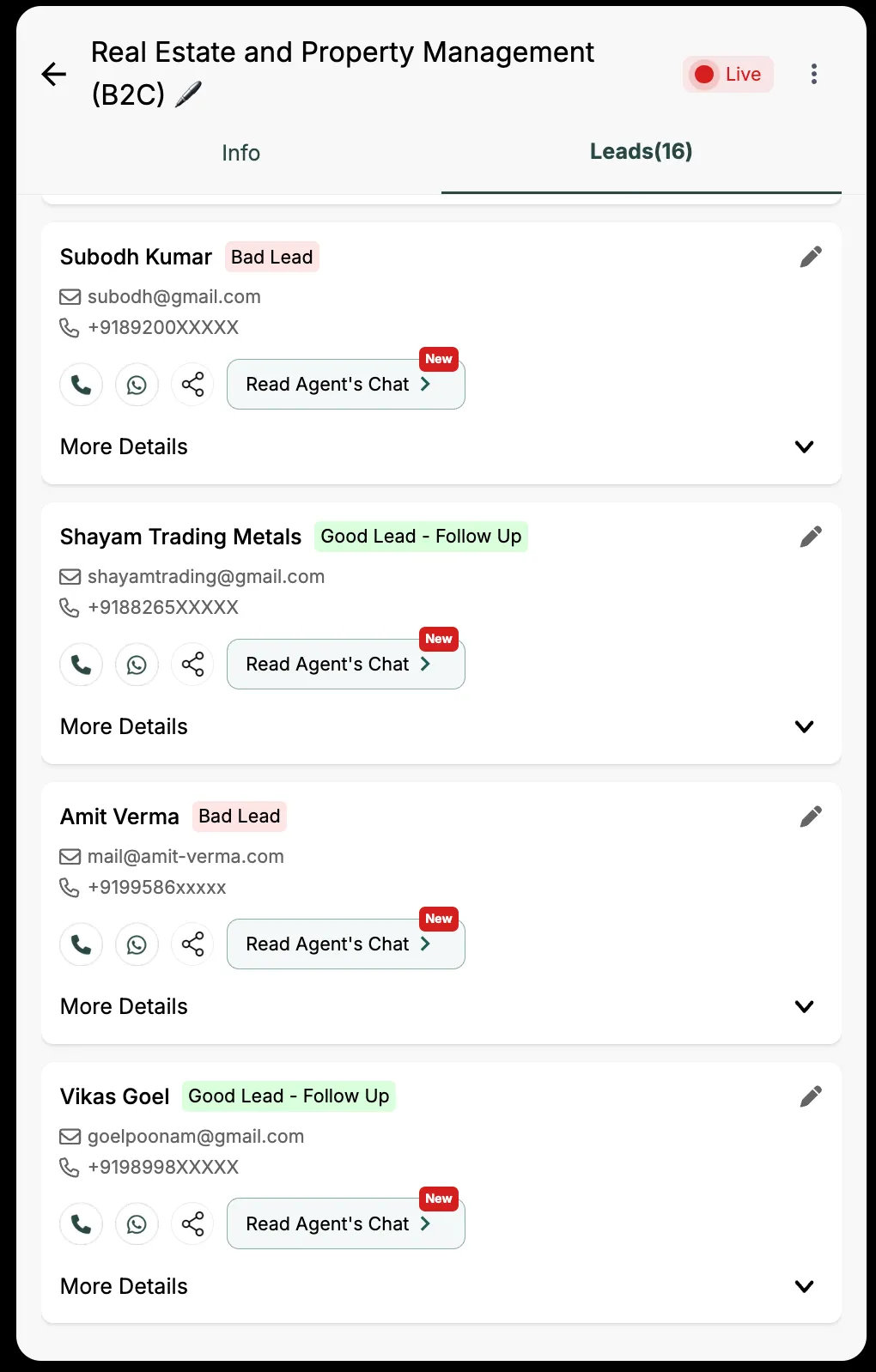
- Use the Meta conversion API to fire custom events, e.g. initial_lead, sales_opportunity, converted, bad_lead etc from your CRM.
- Configure sales funnel stages on Meta events manager consuming those events
- This will train Meta’s algorithm on which leads are good, so it finds more people like them.
Over time, this feedback loop significantly improves ROI, since Meta learns to prioritize ads that deliver high-value customers instead of just raw leads.
Problem 3: I Get Leads, but the Cost is Too High
High CPL (Cost Per Lead) is a signal that either your ad quality is low, or you’re targeting the wrong audience. This problem is pretty much similar to problem 1 (Not getting leads).
How to fix it:
1. Run at least 3 creatives per ad set
— This gives Meta options to test and optimize. Don’t rely on just one ad.
— These creatives can offer different value propositions.
— These creatives can be mix of regional & English languages.
2. Use all placements
— Don’t limit yourself to just Facebook Feed. Run ads on Reels, Stories, Messenger, and Instagram Feed. Costs often vary, and Meta auto-optimizes.
3. Prefer UGC-style creatives
— User-Generated Content (e.g., testimonials, selfie-style videos) works much better than polished corporate ads. They feel authentic and relatable.
4. Experiment with audiences and copies
— Rotate them every 2–3 weeks if performance drops. Ads fatigue over time.
— As mentioned earlier, experiment with many variations of copy from different perspectives and let Meta pick the best-performing one.
5. Run via your own branded Facebook page
— If your page looks inactive or untrustworthy, people won’t engage. Build credibility.
6. Be patient
— Don’t judge results in the first 24–48 hours. Let Meta’s algorithm stabilize before scaling.
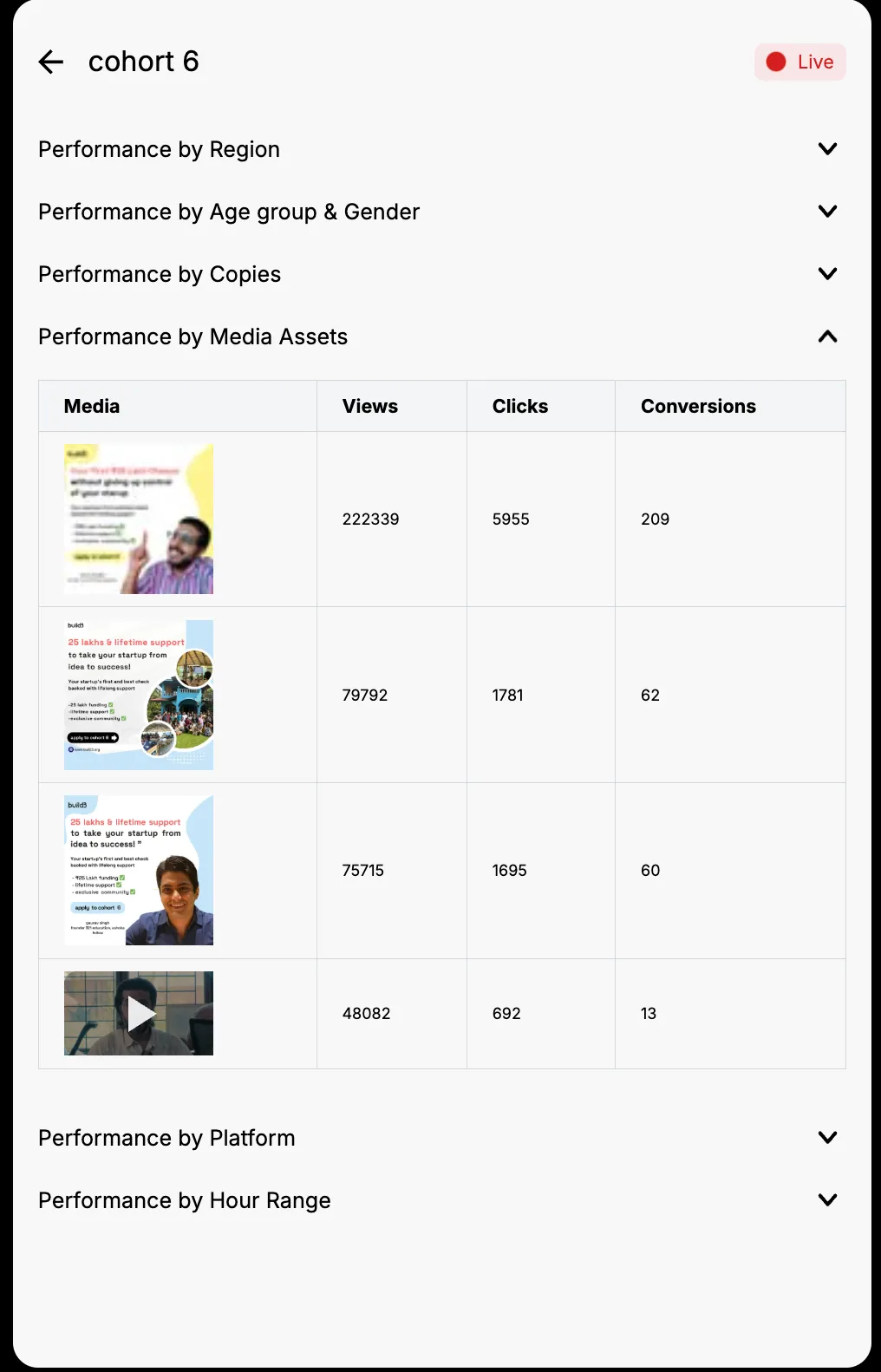
7. Learn from Ad Insights
Running ads without looking at insights is like driving with your eyes closed. Meta gives you a wealth of data that can help you fine-tune your campaigns for better ROI. Don’t just set and forget — review your ad performance regularly and ask the right questions:
- Which regions are performing best? Double down on high-performing geographies and pause underperforming ones.
- When should you stop an ad? If an ad isn’t delivering results after enough impressions, it’s better to cut losses and reallocate budget.
- Where should you spend more? Scale up ads that are giving you the best cost per lead or purchase.
- Should you tweak ad copies or creatives? Compare results between different variations. If the last creative outperformed the current one, consider bringing it back or testing new angles.
- What about audience behavior? Check metrics like CTR, conversion rate, and engagement to understand if people are resonating with your message.
By continuously learning from these insights, you build a feedback loop — every campaign teaches you how to make the next one more effective. Over time, this habit compounds into significantly higher returns with less wasted spend.
Problem 4: I Get Relevant Leads, but I Can’t Convert Them
Congratulations! At least now you have a solid marketing setup. To convert those good leads into customers, you’ll need a proper sales mechanism.
How to fix it:
1. Speed of follow-up
— Contact the lead within 30 minutes of form submission if possible. Response rates drop drastically after 1 hour.
— Use automation (WhatsApp API, SMS, or call dialers) to send an instant acknowledgment or to initiate conversation.
2. Train your sales team
— Your team should know how to pitch in 30–60 seconds.
— Use the data from the lead form to personalize conversations.
— Example: If someone selected “budget above ₹50,000,” tailor the pitch to premium offerings.
3. Have a structured follow-up process
— Not all leads convert on day one. Build a sequence: Day 1 (call), Day 2 (WhatsApp), Day 4 (email), Day 7 (follow-up call).
— Nurture leads with additional content, case studies, or offers.
Problem 5: I Don’t Want to Waste Time on Junk Leads
Well, now you’re in the AI age, where automation is everywhere. Manual filtering is time-consuming — if you’re getting 100 leads a day and half are junk, your team wastes hours sorting them. That’s a waste of time, money, and energy.
How to fix it:
1. Use custom lead form questions
Using custom questions in your lead form is a smart way to gather context up front. Instead of just asking for name, email, and phone, include fields like Company Size or Budget Range (depending upon campaign).
These answers give you a clearer picture of each lead before your team reaches out, helping you identify high-value prospects faster. When connected to your CRM, this data can be used to auto-prioritize leads — so your sales team spends more time on the opportunities most likely to convert.
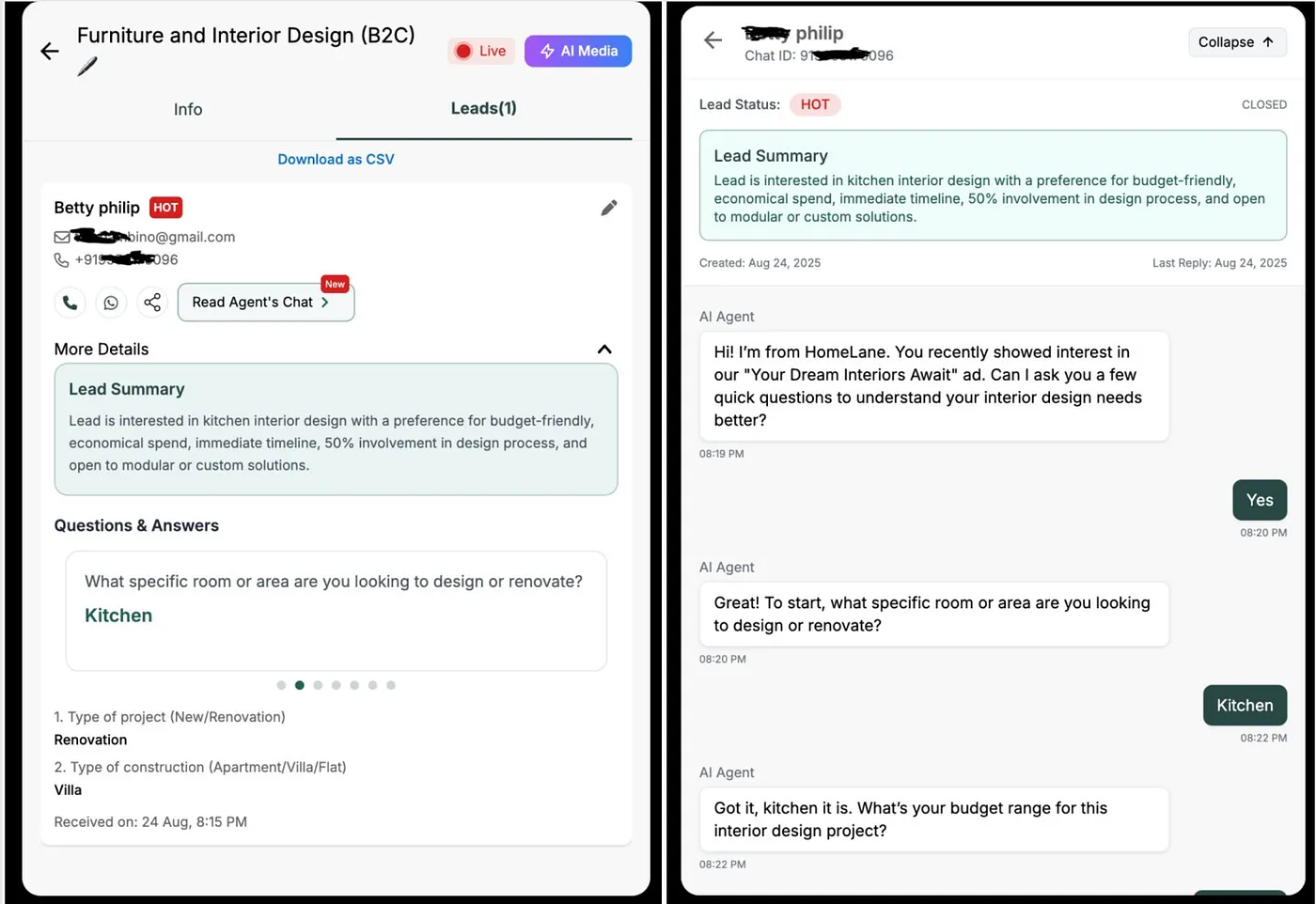
2. AI-powered lead classification
Instead of having your salesteam chase every lead, let AI handle the first layer of filtering. A WhatsApp sales agent or telephony agent can initiate conversations with new leads (e.g., ‘Hi, thanks for signing up — are you interested in X or Y?’). Junk leads usually drop off at this stage, saving your team hours of manual effort. For this to work effectively, your AI agent should be well-prompted, thoroughly tested, and capable of handling frequent queries — while gracefully falling back with subtle responses when it can’t resolve something.
Conclusion
These are my personal learnings — I’m sure I’ve missed some points, and I’d love to hear your thoughts in the comments.
If you’d like to test a new approach, I encourage you to try GrowEasy. Start with a small budget, benchmark your lead quality & cost, and see the difference.
Building in India 🇮🇳

© 2026 AUTOTME SOFTWARE PRIVATE LIMITED. All rights reserved.